Younify Connect — Developer SDK & API

Younify Connect
connect your app to streaming user data

The Younify Connect SDK handles the complexity of streaming account authentication for your app. The Younify Connect API delivers user watch history, cross-service watchlists, and ratings data so your app can start personalizing instantly.

View Technical Overview Already a partner? →
Supported Platforms
iOS v1.0.3 Android v1.0.2 React Native v1.0.2 .NET MAUI v1.0.3
Supported Services
Netflix · Hulu · Prime Video · Disney+ · HBO Max · Paramount+ · Peacock · Apple TV · Discovery+ · Tubi · Pluto TV · Roku Channel · YouTube · Fandango
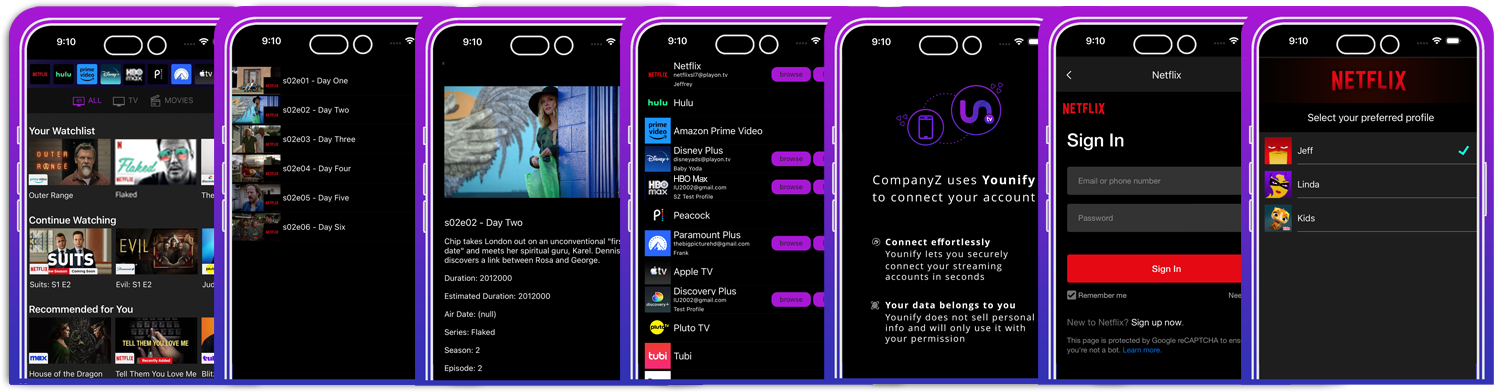
younify-connect-sdk · sample screens
Younify Connect SDK sample screens showing streaming service login UI on iOS and Android
Technical Overview

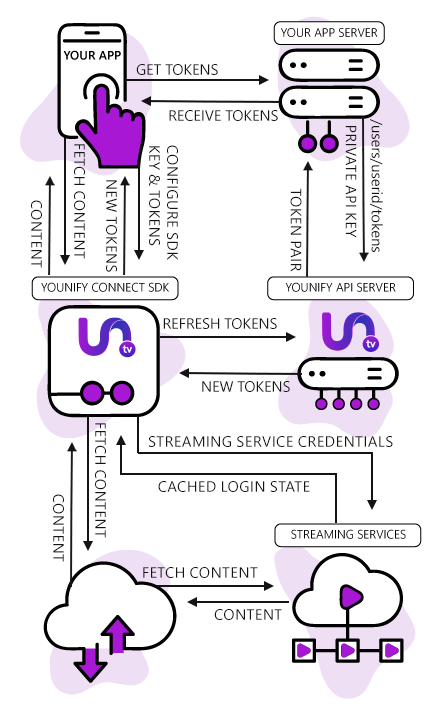
How the Younify Connect SDK works with your app

Younify Connect handles the streaming authentication flow end to end — from MFA and CAPTCHA to session renewal — so your backend never has to process or store a user’s streaming credentials.

1
Request API Tokens
Get token pair through backend app server using API Key
POST /v1/auth/token
2
Initialize SDK
Initialize Younify Connect SDK using the SDK key and the acquired token pair
YCS.initialize(sdkKey, tokens)
3
Token Renewal
Handle access token renewal when expired and needs renewing via the backend
onTokenExpired(handler:)
4
User Links Streaming Service
Enable end user to login to streaming services through the SDK UI
YCS.connect(service: .netflix)
5
Fetch Streaming Data
Fetch personalized content categories for all logged-in streaming services for the end user
GET /v1/user/watchlist
// YOUNIFY CONNECT SDK ARCHITECTURE OVERVIEW
Younify Connect SDK Architecture Flow
API Data Objects

Watch history, watchlists, and ratings API

Every response is normalized to a consistent schema, regardless of which streaming service the data came from. One integration covers all 14+ services — giving you the watch history and watchlist data you need to solve the cold start problem from a user's very first session.

Watch History
Viewing Timeline
Full chronological history of every title a user has watched, including partial views, completion percentage, and timestamps.
Watchlist
Saved & Queued Titles
Cross-service saved titles, continue watching queues, and bookmarked content — merged and deduplicated across all connected services.
Ratings
User Ratings
Star ratings and thumbs up/down signals consolidated across all connected services.
Recommendations
Provider Recommendations Feed
Curated recommendations from each streaming service — personalized for the user by the provider's own algorithm, delivered to your app.
Download Sample Response Data (.xlsx) 3,859 normalized rows — real watch history and ratings data across 8 services
SDK Downloads

Available SDK Downloads

To Each SDK includes documentation, a working sample app, and the relevant framework or package file.

Common Questions

Developer FAQ

Yes. The SDK requires an API Key and SDK Key issued through the partner portal. Contact us to get connected — once you have access, you can create and manage keys directly in the partner portal.
No. Credential handling, MFA, CAPTCHA solving, and session management are all handled inside the YCS SDK layer. Your app only receives normalized data objects — never raw credentials or tokens from the streaming services.
Your backend server handles access token renewal by calling the Management API. The SDK fires an onTokenExpired delegate callback when a token needs refreshing, giving your backend the signal to request a new pair and re-initialize the SDK.
Currently: Netflix, Hulu, Prime Video, Disney+, HBO Max, Paramount+, Peacock, Apple TV, Discovery+, Tubi, Pluto TV, Fandango at Home, YouTube, and Roku Channel — 14 services in total. New services are added regularly.
The cold start problem happens when new users have no viewing history in your app, so your recommendation engine has nothing to work with. By connecting their existing streaming accounts through the Younify Connect SDK, you get immediate access to years of real watch history, watchlists, and ratings — before the user has watched a single thing in your app.
Most partners have the SDK initialized and returning real data within a few hours of receiving their keys. Full production integration — including UI polish and backend token management — typically takes 1–3 days depending on your app's architecture.
PLACEHOLDER
Already a Partner?

Access your developer resources

If you already have a Younify Connect account, everything you need is one click away — partner portal, docs, downloads, Management API, and developer support.

Partner Resources

Your developer toolkit

Everything you need to manage your SDK integration, API access, projects, and support workflows.

Not yet a partner?

Get access to Younify Connect

Request access by filling out the partner inquiry form and we’ll get you set up with API access, SDK credentials, and a partner portal account so you can begin building with Younify Connect.